

Profile
Review and edit the brand, audience, product, and persona details Spar uses when it analyzes your site.
Your site profile is Spar's summary of your business. Spar fills it in from your site audit, and it feeds the ideas, hypotheses, and copy Spar writes for you. Open Settings > Profile after your first audit and fix anything that's off.
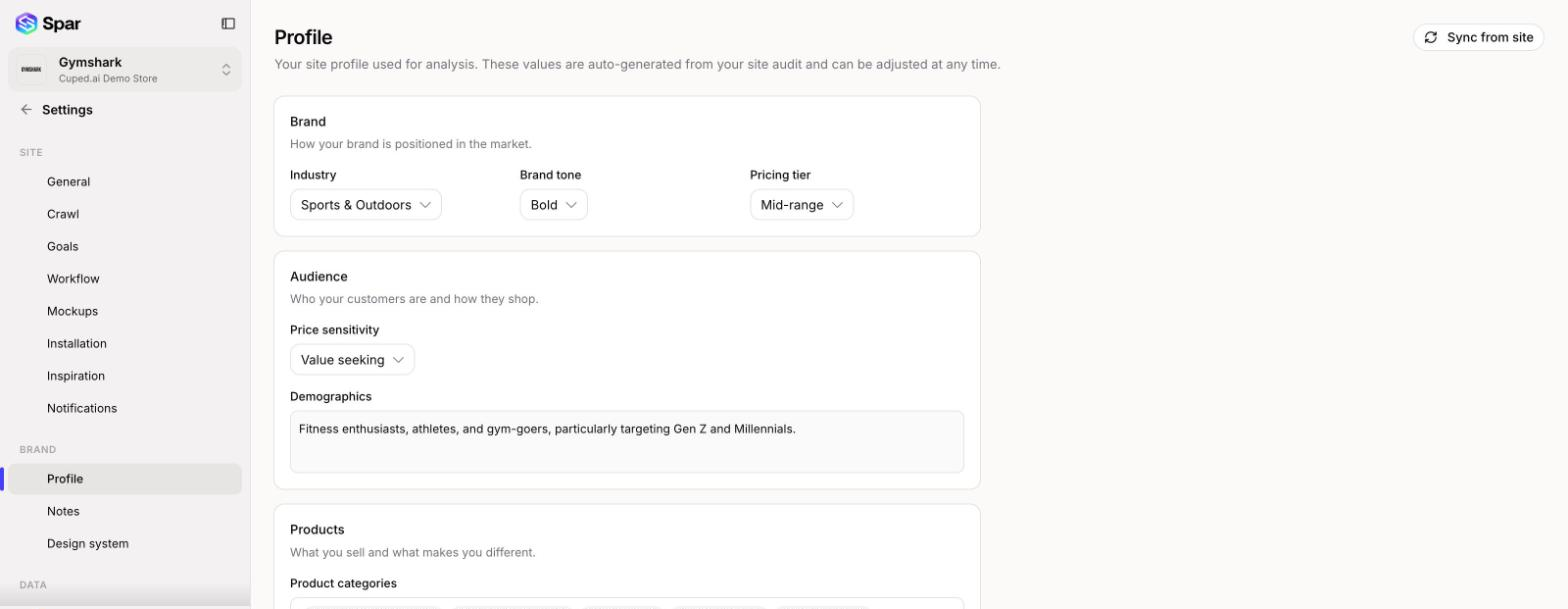
If the page says Site profile has not been created, run a site audit first.
Brand
- Industry: the options depend on your business model.
- Brand tone: how your brand sounds.
- Pricing tier: where your prices sit in the market.
Audience
- Price sensitivity: how much price drives your customers' decisions.
- Demographics: a short description of who buys from you.
Products
- Product categories: up to 15. Type one and press Enter.
- Unique selling propositions: up to 10 things that set you apart. Type one and press Enter.
Save edits to these three cards with the bar at the bottom of the page.
Profiler insights
A read-only summary from the latest profile: a Positioning read, your Price posture, and Supporting evidence quoted from your pages.
Buyer personas
Up to five buyer archetypes that represent your key customers. Click a persona to view it, or click Add persona to create one with a name, description, age range, buying behavior, device preference, buyer intent, price sensitivity, motivation, frustrations, and conversion barriers. Save or discard other changes on the page before adding a persona.
Sync from site
Sync from site (top right) regenerates the profile from your site audit. It overwrites the current profile, including any edits you've made, so Spar asks you to confirm first. This button needs a paid plan.
Last updated on