

Profit
Set the margin, currency, and product costs Spar uses for the profit per visitor objective.
Revenue per visitor treats a high-margin sale and a low-margin sale the same. If you'd rather test for profit, Spar has a Profit per Visitor objective, and Settings > Profit holds the numbers it needs. Product costs come from Shopify, so this page is mostly useful for Shopify stores.
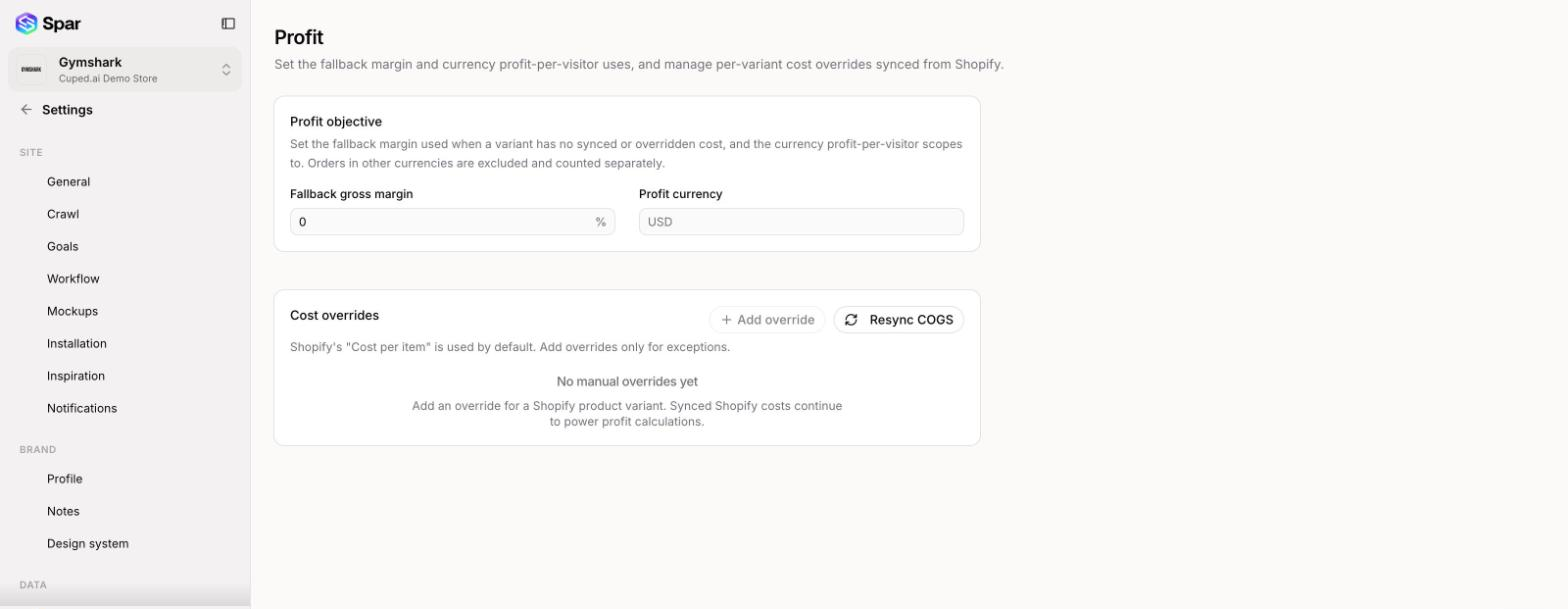
Profit objective
- Fallback gross margin: the margin (0 to 100%) Spar applies when a product variant has no cost from Shopify and no override. The profit objective can't be used until this is set.
- Profit currency: a three-letter code such as USD. Profit per visitor only counts orders in this currency. Orders in other currencies are left out and counted separately.
Save with the bar at the bottom of the page.
Cost overrides
By default Spar uses the Cost per item you've entered in Shopify. Add an override only when that number is wrong or missing for a variant.
- Click Add override. The button is grayed out until you set a profit currency.
- Search for a product, choose the Variant, and enter its Cost per item.
- Click Save override.
Overrides appear in a table with the Shopify cost next to your Manual override. Edit an override right in the table, or clear it to go back to the Shopify cost.
Click Resync COGS to pull the latest costs from Shopify.
Last updated on